 deadmesh
deadmesh does one thing: it makes a Meshtastic LoRa mesh look like a normal internet connection to any application that uses it. No special clients, no modified apps, no mesh-aware software required.
Here's how that actually works.
Architecture
┌─────────────┐                  ┌──────────────┐                ┌──────────┐
│ Mesh Client │  LoRa Packets    │   deadmesh   │  TCP/IP        │ Internet │
│  (Phone /   ├─────────────────>│   Gateway    ├───────────────>│ Services │
│  Handheld)  │  (868/915 MHz)   │              │                │          │
│             │                  │ - Fragment   │                │  HTTP    │
│ Meshtastic  │                  │ - Reassemble │                │  SMTP    │
│    App      │<─────────────────┤ - TLS Proxy  │<───────────────┤  IMAP    │
└─────────────┘                  │ - Cache      │                └──────────┘
                                 │ - Compress   │
                                 └──────┬───────┘
                                        │
                                 ┌──────┴───────┐
                                 │  Serial API   │
                                 │  0x94 0xC3    │
                                 │  protobuf     │
                                 │  want_config  │
                                 └──────┬───────┘
                                        │ USB
                                 ┌──────┴───────┐
                                 │  Meshtastic   │
                                 │  Radio        │
                                 └──────────────┘
The gateway node sits at the boundary between two worlds. On the mesh side it speaks Meshtastic natively. On the internet side it speaks whatever protocol the client application is already using. Neither side needs to know anything
about the other.
Startup Sequence
When deadmesh starts, it doesn't just open a serial port and start listening. It performs a proper handshake with the radio:
1. Open serial port (/dev/ttyACM0) at 115200 baud
2. Send want_config handshake (ToRadio protobuf)
3. Receive MyNodeInfo → auto-detect local node ID
4. Receive device config, module config, channel config
5. Receive NodeInfo for all known mesh nodes → populate node table
6. Begin receiving live mesh packets (position, telemetry, text, etc.)
7. Filter for custom portnum (100) for proxy session traffic
8. All other packets update node table (hops, SNR, battery, position)
Step 3 is worth noting, deadmesh auto-detects its own node ID from the device rather than requiring manual configuration. Every packet from every node on the mesh continues to update the node table in real time throughout the session.
Serial Framing
Meshtastic uses a length-prefixed binary protocol over serial. Every packet follows this structure:
┌────────┬────────┬───────────┬───────────┬─────────────────┐
│ 0x94   │ 0xC3   │ len_hi    │ len_lo    │ protobuf payload│
│ magic0 │ magic1 │ (MSB)     │ (LSB)     │ (FromRadio/     │
│        │        │           │           │  ToRadio)       │
└────────┴────────┴───────────┴───────────┴─────────────────┘
The framing layer handles sync recovery automatically. Magic bytes can be lost mid-stream on noisy serial connections, if that happens the state machine re-synchronizes without dropping the session.
Protocol Detection
deadmesh identifies incoming protocols by inspecting the first few bytes of each connection. No configuration, no port mapping, no per-protocol setup:
| Initial bytes | Protocol | Handler |
|---|---|---|
GET / HTTP/1.1 |
HTTP | Forward to upstream |
CONNECT host:443 |
HTTPS | TLS interception (HTTP/1.1 ALPN) |
EHLO / HELO |
SMTP | Email relay |
A001 NOOP |
IMAP | Mail client support |
\x05 |
SOCKS5 | Transparent tunneling |
\x04 |
SOCKS4 | Legacy tunneling |
This is what makes deadmesh transparent to applications. Your email client sends EHLO, deadmesh recognizes it and routes accordingly. Your browser sends CONNECT, deadmesh handles the TLS handshake. The application never knows it's talking through LoRa.
Packet Flow
The fundamental problem deadmesh solves is the mismatch between what internet protocols expect (reliable, fast, large packets) and what LoRa provides (slow, duty-cycle-limited, ~220 byte payloads).
Outbound (client → internet):
HTTP GET request (1500 bytes)
└─> Split into 7 LoRa packets (~220 bytes each)
└─> Each tagged with sequence number + session ID
└─> Sent hop-by-hop through mesh to gateway on portnum 100
└─> Gateway reassembles → proxies to internet
Inbound (internet → client):
HTTP response (50KB HTML)
└─> Compressed if plugin.compressor enabled (~5-10KB)
└─> Cached if cacheable (saves future airtime)
└─> Fragmented into LoRa packets with flow control
└─> Client reassembles → delivers to application
Compression before fragmentation is significant → a 50KB HTML response compressed to 5KB requires 23 LoRa packets instead of 228. Over a network where EU duty cycle regulations cap airtime at 1%, that difference is the gap between working and not working.
The Node Table
Every packet deadmesh receives every position update, telemetry report, and text message on the mesh and updates a persistent in-memory node table. Fields are populated from whatever source provides them:
- NodeInfo (startup dump): short name, long name, position, SNR, last heard
- Any packet header: hops away, SNR, last heard timestamp
- POSITION_APP: latitude, longitude, altitude
- TELEMETRY_APP: battery level
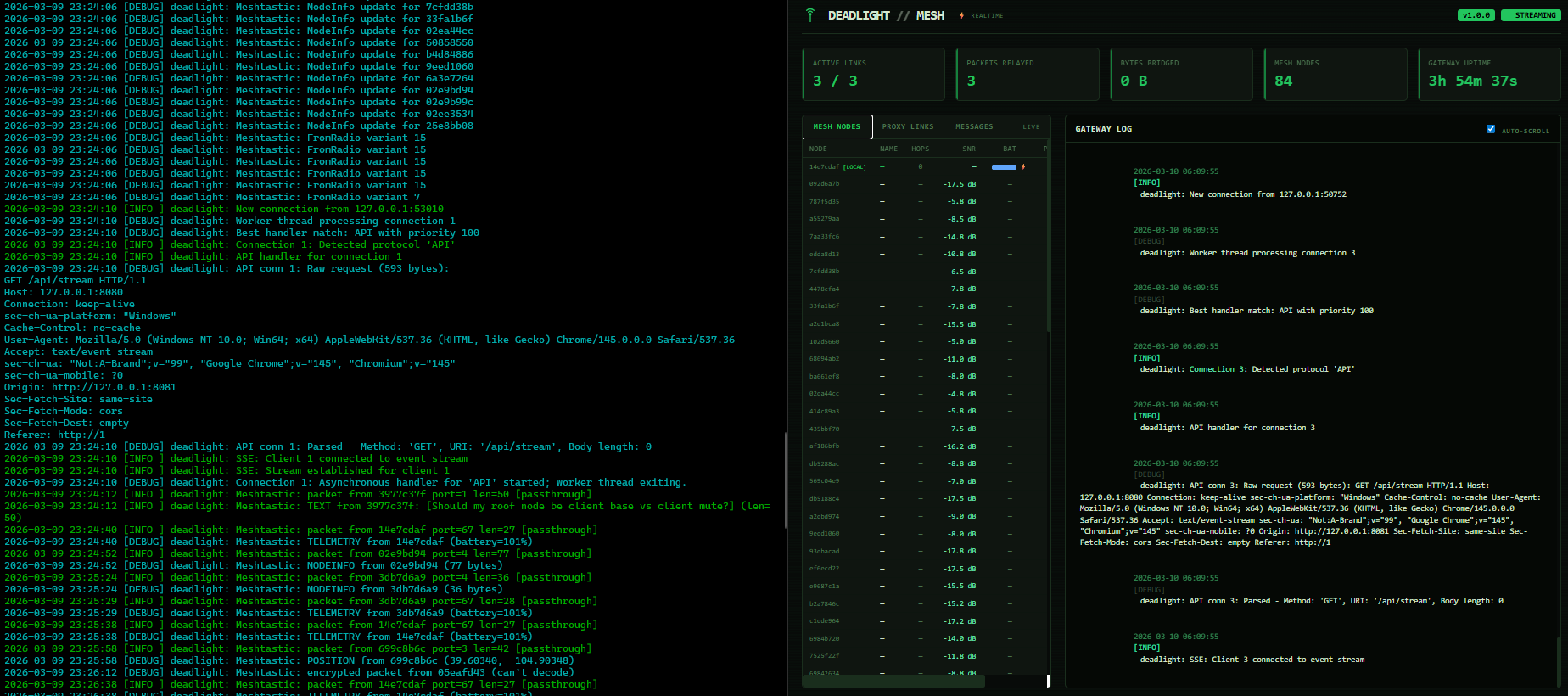
This is what powers the live dashboard: 95+ nodes visible, updating in real time from ambient mesh traffic, with no dedicated polling or extra airtime cost.
What's Next
The proxy is verified working. The serial API is active. The dashboard is live.
The next milestone is end-to-end proxy sessions over actual LoRa air -> synthetic testing with mesh-sim is solid, real over-the-air sessions are next. After that: the mesh:// scheme, adaptive fragmentation, and a node topology map that visualizes the mesh graph from hop data.
The technical foundation is passing intial testing. What's coming next is where it gets exciting...
Be the first to comment on this post.